Facebook Photo Downloader
Save any public Facebook picture as a full-resolution JPG — single photos, whole albums, profile pictures and cover banners. No screenshotting, no app, no login.
HD Quality100% Free & SafeMP4 & MP3
How does it work?Save a Facebook Photo in Three Steps
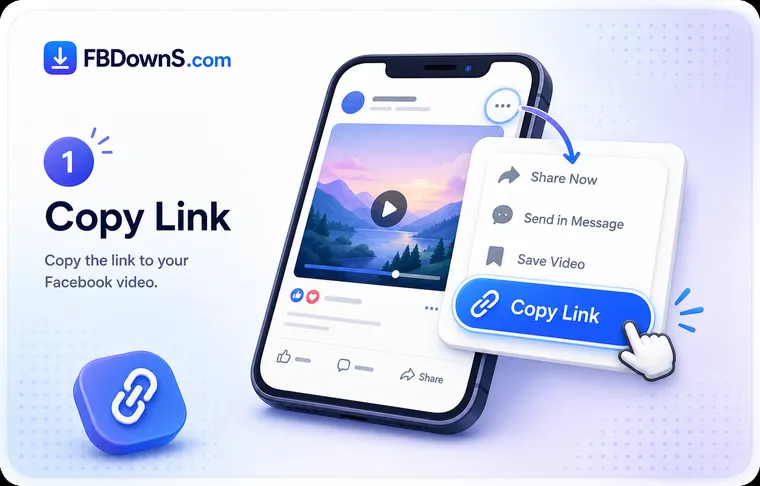
Open the picture at full size first
Tap or click the photo so it opens in Facebook's own image viewer, filling the screen instead of sitting inside the feed. This matters: the feed shows a shrunken preview, while the viewer points at the larger stored file. Only continue with pictures that are public or that belong to you.
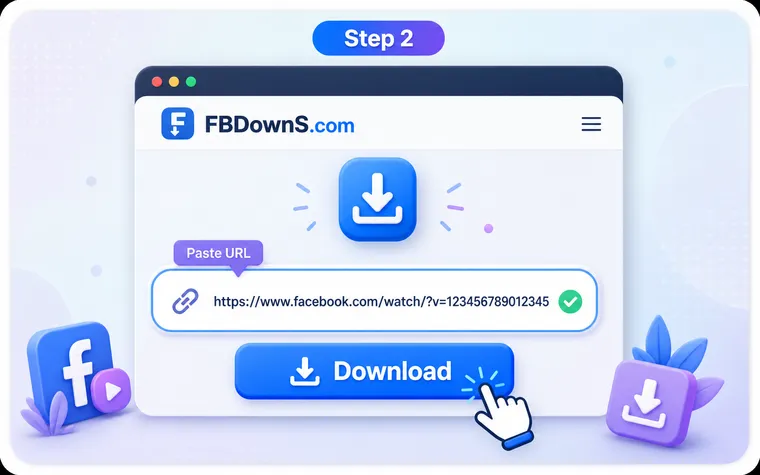
Copy the link to that exact image
On a computer, copy the URL from the address bar once the viewer is open. In the Facebook app, use the three-dot menu on the photo and choose Copy link. Grab the link on the image itself — not on the profile, group or search page it appeared on.
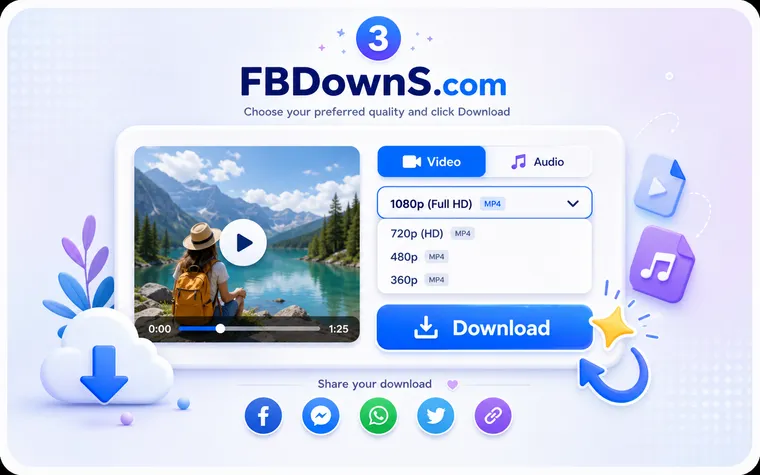
Paste it and save the JPG
Drop the link into the box at the top of this page and press Download. FB DownS reads the link, requests the largest JPG Facebook kept for that image, and hands you the file — into Photos or Gallery on a phone, or the Downloads folder on a desktop.
Four Kinds of Facebook Picture You Can Save
A single post photo
One picture from a status update, a comment or a shared link. Open just that image, copy its link and you get the full-size JPG back — the quickest kind of save, done in two taps.
A whole album
Holiday sets, wedding galleries and event collections live in albums. Move through them image by image so every shot keeps its stored resolution, instead of screenshotting a wall of thumbnails one by one.
A profile picture
Profile shots are square and often re-cropped by Facebook. Open the picture so it enlarges, copy the link, and pull back the largest square copy Facebook holds — handy for archiving your own past avatars.
A cover photo
Cover banners are wide, low-set and easy to lose quality on. Enlarge the banner, copy its link, and save the full-width JPG so the panorama stays intact rather than cropped down to a strip.
Why Your Saved Photo Looks Softer Than It Did On Screen
A picture that looked sharp while you scrolled can arrive on your device looking soft, and the reason is baked into how Facebook serves images. For the feed it generates a lightweight preview so the page loads quickly on any connection; the full-size file it received on upload sits quietly behind that preview. Whether your saved copy is crisp or muddy depends entirely on which of those two files you actually captured.
Preview file versus stored original
Screenshotting or long-pressing the visible image grabs the preview — the small, heavily compressed version your browser happened to paint. FB DownS instead follows the link to the image record and asks for the biggest JPG Facebook is holding for it, which is why opening the picture in its full-screen viewer before copying the link matters so much: the viewer is what points at the larger file.
Getting the Sharpest File — and Using It Fairly
How high can the quality actually go?
The download can only be as good as what was uploaded. Facebook re-encodes every image it receives, so the "original" you retrieve is the best copy Facebook decided to keep, not the untouched camera file. If someone posted a small or already-compressed picture, no tool can invent detail that was never stored — but for photos uploaded at high resolution, pulling that stored copy is far better than any screenshot. Because JPG loses a little each time it is re-saved, grab the source once and keep that clean file rather than passing screenshots around.
EXIF, ownership and saving responsibly
Most photos come off Facebook stripped of their original EXIF data — camera model, GPS location and capture time are usually removed during upload — so a downloaded JPG rarely carries that metadata, which is good for privacy but means it is not an original camera file. Save only pictures that are public or that belong to you, and remember that copyright stays with whoever made the image. Do not re-publish, sell or misrepresent someone else's photo, and never rely on a downloader to reach pictures behind privacy settings — it simply makes it easier to keep a full-quality copy of images you already have the right to save.
Screenshot vs. Full Download: What Actually Changes
| What you get | Screenshotting the photo | Downloading with FB DownS |
|---|---|---|
| Pixel size | Only as many pixels as your screen showed — usually a shrunk feed preview. | The largest stored copy Facebook kept, at the width the picture was uploaded. |
| Sharpness | Soft edges and smeared text baked in from the on-screen preview. | Crisp detail carried straight from the source file, no on-screen softening. |
| Colour | Can shift with night mode, brightness or a colour-filtered display. | True colours as encoded in the file, independent of your screen settings. |
| Extra clutter | Captures buttons, captions, cursors and the surrounding interface. | Just the image — no overlay, no chrome, nothing to crop away afterwards. |
| File type | A fresh PNG or JPG re-compressed on top of Facebook's compression. | A clean JPG, saved once, with no second round of compression added. |
| Printing & cropping | Falls apart quickly — enlarging a preview just magnifies the blur. | Holds up when printed or cropped, because the pixels were there to begin with. |
Facebook Photo Downloads — Your Questions
Will a downloaded Facebook photo keep its full resolution?▾
It keeps the largest copy Facebook stored for that image, which is far bigger than the feed preview. It cannot exceed what was uploaded, though — if the poster shared a small picture, that smaller size is the ceiling. For a photo uploaded in high resolution, you get a genuinely sharp JPG rather than a shrunken thumbnail.
Can I download an entire Facebook album at once?▾
You save an album by working through its pictures one after another, so each shot comes back at the size Facebook kept rather than as a batch of previews. There is no cap on how many you save, and larger albums simply take a little longer because every image is fetched individually at full quality.
How is this better than just screenshotting the photo?▾
A screenshot can only hold as many pixels as your screen showed, so it captures the compressed preview plus any buttons, captions or cursor on screen. Downloading pulls the stored source file itself — no interface clutter, no second round of compression, and enough detail left to crop or print later.
Can I download someone's profile picture or cover photo?▾
Yes, when they are public. Open the profile picture or cover banner so it enlarges, copy that image's link and paste it here. Cover photos come back at full width so the wide banner stays intact. Only save pictures that are public or yours, and don't reuse a person's image in a misleading way.
Does the downloaded file keep EXIF data like camera model or location?▾
Usually not. Facebook strips most EXIF metadata — GPS coordinates, camera model and capture time — when a photo is uploaded, so the JPG you download rarely carries it. That protects the poster's privacy, but it also means the file is not the untouched original from the camera.
What format are the photos saved in, and can I edit them?▾
Almost every Facebook photo comes back as a standard JPG, which opens in any viewer or editor and prints without fuss. Because JPG is already compressed, avoid re-saving the same file repeatedly — pull the clean original once and edit a copy of that instead.
Can I download private Facebook photos?▾
No. FB DownS only works with images you are already allowed to view and cannot bypass Facebook's privacy settings or reach photos restricted to people you are not authorised to see. If a picture is private, deleted or region-blocked, it cannot be fetched.
Why did my photo download fail?▾
The most common cause is copying the wrong link — grab it on the open image in the viewer, not on the profile, group or search page around it. Private, deleted or region-blocked pictures also cannot be pulled. FB DownS processes images on demand and never stores your photos or keeps a download history.
More Facebook download tools
Facebook Video Downloader
Save any public FB video in HD MP4.
Facebook Reels Downloader
Download Reels with sound, no watermark.
Facebook Story Downloader
Save Story videos & photos before they expire.
Private Video Downloader
Save private videos you're allowed to view.
Facebook to MP3 Converter
Extract audio from any Facebook video.
Popular guides
Related searches
These are the ways people most often ask to save Facebook pictures — FB DownS covers all of them:
- facebook photo download
- save facebook picture full size
- facebook album downloader
- download facebook profile picture
- facebook cover photo download
- facebook image full resolution download
- save facebook photo without screenshot
- facebook jpg download
- how to download facebook album
- facebook picture saver hd