Save Facebook Videos for Offline Viewing
Keep any Facebook video as a real MP4 you can watch with no internet, sort into folders and re-download anytime. Paste a link — no login or app needed.
HD Quality100% Free & SafeMP4 & MP3
How does it work?Save a Facebook Video to Your Library in 3 Steps
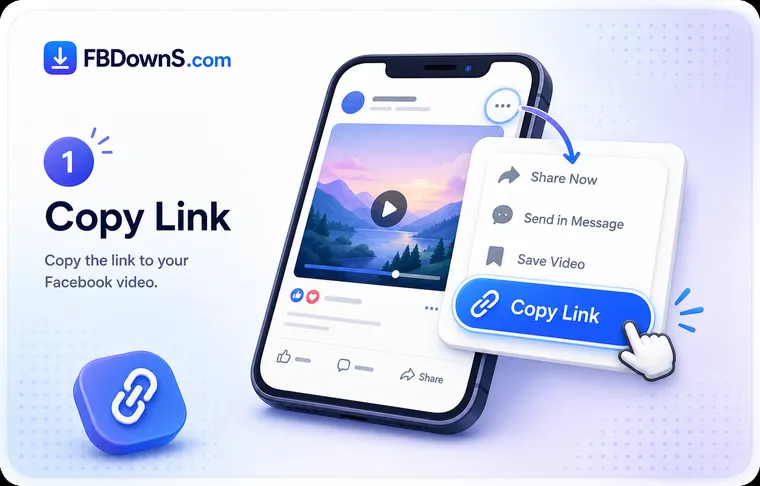
Step 1: Grab the Link You Want to Keep
Open the video on Facebook, tap Share or the three-dot menu, and choose "Copy link". If you are building a library from several posts, keep a notes app open and paste each link there so you can work through them one after another.
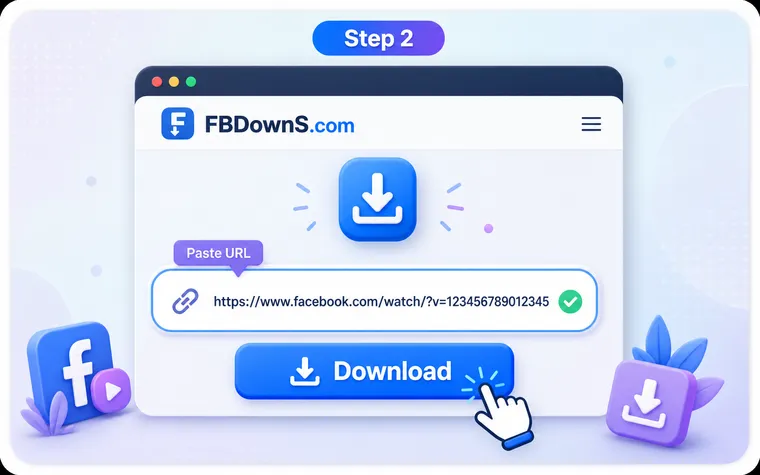
Step 2: Paste It and Choose the Master Copy
Drop the link into the box at the top of this page and press Download. Pick the HD MP4 when you want the version worth archiving, or the smaller SD file when you are saving many clips and storage matters more than resolution.
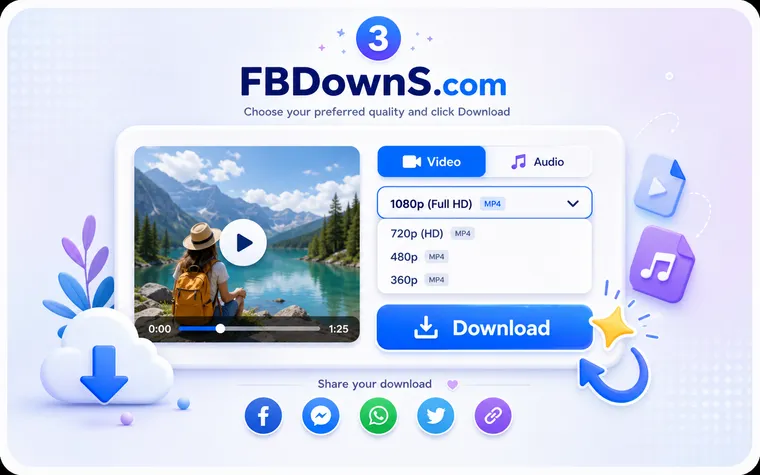
Step 3: File It Where You Will Find It Again
Once the MP4 lands on your device, move it into a named folder — "Recipes", "Family 2026", "Work talks" — instead of leaving it loose in Downloads. Ten seconds of tidying now is the difference between a library and a pile.
From a Feed You Scroll to a Library You Own
Why keep a copy instead of a bookmark
Facebook's Save button feels like keeping a video, but it only writes a bookmark to a private list — a pointer to somebody else's post. The moment that person deletes the video, switches their audience to Friends only, or deactivates their account, the bookmark leads nowhere and the clip is gone. Downloading produces a real MP4 that sits in your own storage: it plays with the internet switched off, it survives whatever happens to the original post, and it can be copied to a laptop, a drive or the cloud like any other file. That independence is the whole point of saving rather than bookmarking.
Turning saved clips into an organised library
A folder of files named video_9182.mp4 is only marginally better than a feed you cannot search. The fix takes seconds: rename each save to something meaningful and drop it into a themed folder — recipes, a child's milestones, talks from a conference, exercises from a class. On a phone the Files app (iPhone) or a file manager (Android) does this; on a computer it is ordinary drag-and-drop. Once a routine exists, a saved-video library becomes genuinely useful: you can find the thing you kept, back the whole folder up in one action, and hand a single clip to someone as a plain file that opens instantly, with no app or account required.
Where a Saved Facebook Video Lands on Each Device
Android Phones and Tablets
The MP4 usually appears in the Downloads folder and in your Gallery under a Download or Browser album. Use the Files app to move it into a folder you name, or straight onto an SD card if your phone has one.
iPhone and iPad
Safari saves the file into the Files app under Downloads first — not the Camera Roll. Open it there, tap Share, then "Save Video" to push it into Photos, or leave it in Files and sort it into folders inside iCloud Drive.
Windows PCs
The video drops into your account's Downloads folder by default. Cut and paste it into Videos, or a dated project folder, so a month of saved clips does not bury everything else you download.
Mac
Safari and Chrome place the MP4 in Downloads, shown in the Dock stack. Drag it into a Finder folder or into the Photos app, and it will sync across your other Apple devices through iCloud if that is switched on.
Chromebooks
Files save into the Downloads area of the Files app, which lives in local storage. Move anything you want to keep long term into Google Drive, because the local Downloads folder can be cleared when space runs low.
External Drives and SD Cards
A saved MP4 is an ordinary file, so it copies to a USB stick, an external SSD or an SD card like any video. This is the safest home for a library you never want to lose to a single broken device.
What You Get When You Save Instead of Bookmark
A Library, Not a Feed
Every saved video is a file you arrange your own way — by folder, by year, by topic. Nothing scrolls away and nothing depends on an algorithm deciding to show it to you again.
Plays With No Signal
A downloaded MP4 opens on a plane, a subway or a dead-zone road with zero buffering and zero mobile data, because the whole video already lives on your device.
Re-Save After a Reset
Wiped your phone or bought a new one? As long as the original post is still public, the same link rebuilds your collection — and files you copied to a drive were never at risk at all.
Keep the HD Master
Archive the best merged file Facebook publishes, normally a 720p HD MP4, so your saved copy stays as sharp as the source instead of a shrunk-down screen recording.
Nameable, Movable Files
Rename each clip to something you will recognise later and drop it into any folder. A saved MP4 behaves like every other video on your device — no special app to open it.
Your Collection Stays Yours
Everything you save sits in your own storage, not on our servers and not tied to your Facebook account. No login is involved, so nothing about what you keep is logged.
Saving Facebook Videos Offline — Frequently Asked Questions
will my saved facebook videos play without an internet connection▾
Yes. Once the MP4 has finished downloading, the entire video lives on your device, so it plays in airplane mode, on a flight or anywhere with no signal. This is the main reason to save a file instead of relying on Facebook's Save bookmark, which needs a connection every time you open it.
where do saved facebook videos go on my phone▾
On Android the file usually appears in the Downloads folder and in a Gallery album called Download. On iPhone it saves into the Files app under Downloads first, not the Camera Roll — open it there, tap Share, then "Save Video" to move it into Photos. The destination is set by your browser, not by Facebook.
what is the difference between saving a video and using facebook's save button▾
Facebook's Save button bookmarks a post to a private list but stores nothing on your device, so it breaks if the poster deletes or restricts the video. Downloading creates a real MP4 in your own storage that you own outright, plays offline, and keeps working no matter what happens to the original post.
how do i organise a library of saved facebook videos▾
Rename each download to something you will recognise and move it into themed folders — for example Recipes, Family or Work — using the Files app on a phone or drag-and-drop on a computer. Because every save is an ordinary MP4, you can sort, search and back up the whole collection like any other video files.
will a saved facebook video disappear if the person who posted it deletes it▾
No. That is exactly what makes downloading safer than bookmarking. A Facebook Save bookmark points at the live post and dies with it, but a downloaded MP4 already sits in your storage and is completely unaffected by the poster deleting, hiding or restricting the original.
do i have to re-save my facebook videos after a factory reset▾
Only the files kept solely on the wiped device are lost. Anything you copied to an external drive, an SD card or the cloud is untouched. For the rest, as long as the original videos are still public you can paste the same links and rebuild the collection — which is why backing a library up off-device is worth doing.
can i move saved facebook videos to an sd card or external drive▾
Yes. A saved video is a normal MP4, so it copies to an SD card, a USB stick or an external SSD exactly like any other file, using your phone's file manager or your computer's file explorer. Storing a library on a separate drive protects it from a single device failing.
do saved facebook videos take up a lot of storage▾
It depends on length and quality. An HD 720p MP4 of a few minutes is typically tens of megabytes; the SD option is noticeably smaller. If you are archiving many clips, choose SD for everyday saves and keep HD only for the ones worth a full-quality master, then park large collections on a drive or in the cloud.
how do i keep a facebook video before it gets deleted▾
Save it now rather than bookmarking it. Copy the video's link, paste it into the box at the top of this page, and download the MP4 to your device. A downloaded file is yours permanently, so it survives the poster removing the video, changing the audience, or closing the account.
can i build an offline collection of my own facebook uploads▾
Yes, and it is one of the best uses of this. Videos you posted over the years are easy to lose to a broken phone or a deactivated account, so downloading each one gives you the original file back. Save them into a dated folder and copy that folder to a drive for a proper personal archive.
More Facebook download tools
Facebook Video Downloader
Save any public FB video in HD MP4.
Facebook Reels Downloader
Download Reels with sound, no watermark.
Facebook Story Downloader
Save Story videos & photos before they expire.
Private Video Downloader
Save private videos you're allowed to view.
Facebook Photo Downloader
Download photos in full resolution.
Facebook to MP3 Converter
Extract audio from any Facebook video.
Related searches
If you are trying to keep, organise or back up Facebook videos, these are the searches this page answers:
- save facebook video offline
- watch facebook video without internet
- where do saved facebook videos go
- facebook video offline library
- organise saved facebook videos
- save facebook video to sd card
- back up facebook videos
- save facebook video vs bookmark
- keep facebook video before deleted
- save my own facebook videos
- save facebook video to files app
- move saved facebook video to gallery
- download facebook video for offline viewing
- save facebook video to external drive
- facebook save for later vs download
- archive facebook videos