FB DownS.com

Private Facebook Video Downloader

Save private Facebook videos you are authorised to view in HD MP4 — no login, no app to install, and downloads straight to your device.

HD Quality100% Free & SafeMP4 & MP3
How does it work?

Save Private Facebook Videos You're Allowed to View

Can you download private Facebook videos? Yes — but only the ones you are already authorised to view. That means your own private uploads, videos posted in a group you belong to, and clips a friend or admin has given you permission to keep. If you can press play on a video while logged into your own account, FB DownS can help you keep an offline MP4 copy of it. It runs in any browser on Android, iPhone, Windows and Mac, with no app and no extension to install.

What this tool cannot and does not do

To be completely clear: FB DownS cannot unlock a video you are not allowed to see. It does not get around Facebook privacy settings, it does not access anyone's account, and it never touches content restricted to an audience you are not part of. If Facebook will not show you a video, no legitimate tool will — and we will not pretend otherwise. There is also no way to download someone's private video without their knowledge and without permission; that is not a feature, it is a line we do not cross.

Steps to download a private Facebook video

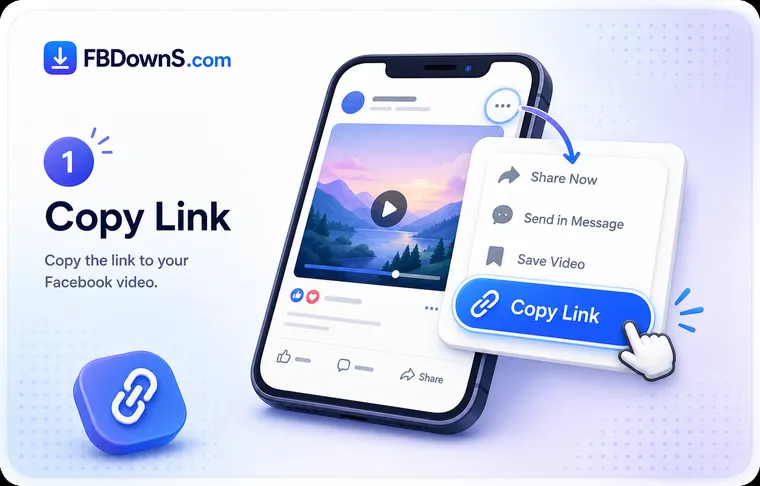
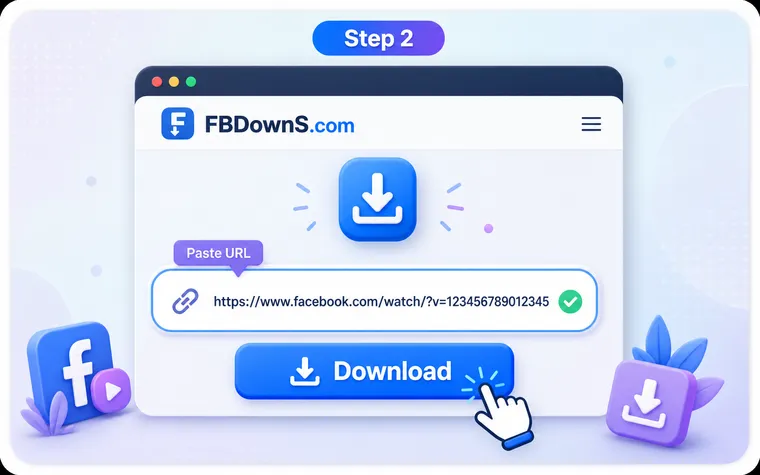
Stay logged into Facebook, open the video you are allowed to watch, and copy its link from the Share or three-dot menu. Paste that link into the box at the top of this page and pick a quality — the file then transfers directly from Facebook's servers to your browser. If a link alone cannot reach a tightly restricted clip, the honest fallback is your device's own screen recorder, used only on a video you have permission to keep.

Save an Authorised Private Video in 3 Steps

Step 1: Open a Video You're Allowed to View

Log into your own Facebook account and open the private video you already have permission to watch — your upload, a post in your group, or a friend's clip you're allowed to see. If you can't view it in Facebook, no tool can save it.

Step 2: Copy the Link or Use the Browser Method

Tap the Share button or three-dot menu and choose "Copy link". Paste it into the box at the top of this page. For tightly restricted audiences where a link isn't enough, use the in-browser save method or your device's screen recorder on the video you're authorised to keep.

Step 3: Choose a Quality and Download

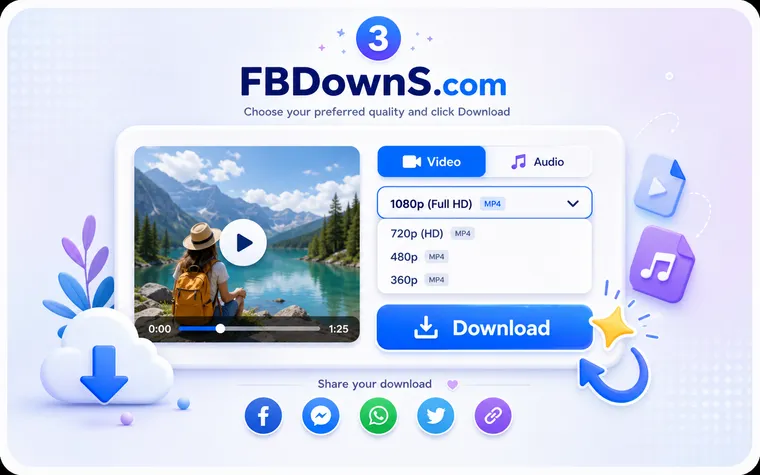
Pick SD or HD and click Download to save the MP4 to your device. On phones it lands in your Gallery or Files app; on a computer it goes to your browser's Downloads folder.

Add to Home screen

Add FB DownS to Home Screen

Add FB DownS to your home screen for quick access anytime, allowing you to download Facebook videos instantly without installing an app or using device storage.

Why Use FB DownS for Private Facebook Videos?

Respects Facebook Privacy

FB DownS never bypasses privacy settings or accesses accounts. It only helps you save videos you are already authorised to view, so you stay on the right side of Facebook's rules.

No Login, No Password Asked

We never ask for your Facebook password or account access. You stay signed in on Facebook itself and simply bring us a link to a video you can already watch.

Free & Unlimited

Saving your authorised private videos is completely free, with no sign-up, no subscription and no daily cap. Keep as many of your own clips as you like.

Works in Any Browser

There is no app or extension to install. FB DownS runs directly in Chrome, Safari, Edge and Firefox on phones, tablets and computers alike.

Original Quality, Correct Audio

When a downloadable link is available, you get the source MP4 with SD and HD options and properly synced audio — no re-encoding and no quality loss.

No Data Stored

Links are processed on demand and nothing is saved on our servers — no video, no history and no personal data. Your activity stays private to you.

What Counts as a Private Video You Can Save

Your Own Private Uploads

Videos you posted to your own timeline with a limited audience are yours to keep. Open your upload, copy its link, and save an offline MP4 backup whenever you want.

Videos in Groups You Belong To

Clips shared inside a private or closed group you're a member of are visible to you. As long as you're allowed to watch them, you can save them for offline reference.

Friends-Only Posts You Can View

When a friend shares a video with their friends list and you're part of that audience, you can already watch it — and keep a copy with the copy-link method.

Content You Have Permission to Save

If the person who posted a video has given you their okay to keep it, that's exactly the kind of content FB DownS is built to help you save responsibly.

Consent First: What This Tool Will Never Do

A private video is shared with a limited audience on purpose. FB DownS is built to respect that. It only helps you keep videos you already have honest access to — never to see or take content that someone chose to keep away from you.

Get consent before you save someone else's video

If a clip belongs to a friend, a group member or a creator, ask before you download it, and never re-post or share it beyond its intended audience. Saving a video you're allowed to watch is fine for personal offline use; publishing someone's private moment is not.

Looking for public clips instead? Our main Facebook video downloader handles any public video without a login. Use this private page only for content you are personally authorised to view.

What FB DownS Cannot Do

No Bypassing Privacy Settings

FB DownS cannot and will not work around Facebook's audience controls. A video hidden from you stays hidden — there is no legitimate way around that, and we don't offer one.

No Account Access or Hacking

We never log into, guess, or touch anyone's Facebook account. Nothing here involves passwords, sessions belonging to others, or any form of account access.

No Videos You Can't Already See

If Facebook won't show you a video because you're not in its audience, FB DownS can't fetch it either. The tool only mirrors access you already legitimately have.

A Plain-English Guide to Saving Private Facebook Videos Honestly

A private Facebook video is a clip Facebook shows to a limited audience instead of the whole world — a friends-only upload, a recording inside a members-only group, or a moment shared with a small circle that includes you. What they all have in common is that you can already press play while signed in. That is the line FB DownS works within: if the video streams for you, you can save it; if it never loads, it is not yours to take.

How can I download private Facebook videos with authorised tools?

An authorised tool mirrors access you already hold instead of manufacturing new access. Stay logged in on Facebook, open the clip, copy its link from the Share or three-dot menu, and paste it here. FB DownS hands you an MP4 in the quality you pick, transferred straight from Facebook to your browser. There is no extension to sideload and no password to type — if a downloader asks for your Facebook credentials, walk away.

Why it cannot reach content you're not meant to see

Facebook decides who may watch each video, and that check runs on their servers long before a download tool is involved. If you are not part of a clip's audience, the file never streams for you at all — so there is nothing for a saver to copy. FB DownS does not bypass privacy settings, guess passwords or peer into accounts, and no honest tool anywhere does. There is likewise no way to download someone's private video without their knowledge; a downloader can only ever mirror access you genuinely have.

How do I download a video from a private Facebook group?

You can save a group video if — and only if — you are a member of that group and the clip already plays for you. Open it while logged in, copy the link from the post's Share or three-dot menu, then paste it here and pick a quality. Group admins often set rules about what may leave the group, so check them first, and keep treating a members-only recording as private material even once you have the file. If you are not in the group, nothing loads and nothing can be saved.

Can I download a Facebook video sent in a private message?

Messenger attachments are outside what a link-based online downloader can handle, because a chat video has no shareable post URL for the tool to read. If someone is happy for you to keep a clip they sent, ask them for the original file, use Messenger's own save option where it appears, or record your screen with their agreement. What you should not do is look for a workaround to extract a private conversation's contents — a message was sent to you personally, not published.

Consent and respect for the person who posted it

Being able to save a clip is not the same as being free to do anything with it. Someone chose a narrow audience for a reason, so treat a saved private video as a personal keepsake rather than something to broadcast. Before downloading a video belonging to a friend, a group or a creator, ask if they mind — and afterwards keep it to yourself. Re-posting a private moment undoes exactly the privacy the uploader was counting on.

Private content for business and commercial use

The answer does not change for agencies or commercial clients: a downloader can only reach what the account viewing it is entitled to see. Brands should archive their own uploads, and anything belonging to a client, partner or creator needs written permission before it is saved or reused. No legitimate service sells privileged access to restricted Facebook content, and FB DownS offers no bulk, cloud or API pipeline for it either — every download is one video, in one browser, by one authorised person.

Device and quality basics

On Android the MP4 usually lands in Downloads or your Gallery; on iPhone it arrives in the Files app ready to move into Photos; on Windows or Mac it drops into your browser's Downloads folder. HD here means the best merged file Facebook publishes — normally 720p rather than true 1080p or 4K. Nothing is re-encoded, so audio stays in sync, and the transfer runs from Facebook straight to your browser rather than through our servers.

Private Facebook Video Downloader — FAQ

What does "private Facebook video" mean on this page?

It means a video that Facebook restricts to a limited audience rather than the public — for example your own friends-only upload, a clip inside a private group you belong to, or a post shared with selected people. On this page, a private video is one you are already allowed to view while logged in, not a hidden video you have no access to.

Do I need to be logged in and authorised to save a private video?

Yes. The only videos FB DownS can help you save are ones you can already watch on your own logged-in Facebook account. Being authorised — as the uploader, a group member, or an approved viewer — is what makes saving possible and keeps it honest.

Can FB DownS download a private video I'm not allowed to see?

No. This is the most important point: FB DownS cannot access videos outside your permission. It does not bypass privacy settings, break into accounts, or reveal hidden posts. If Facebook won't let you watch a video, no legitimate tool — including ours — can save it.

how to download private facebook videos

Log into your account, open your own upload, tap the Share or three-dot menu and choose "Copy link". Paste that link into the box at the top of this page and pick a quality. Since it's your own video, you're fully entitled to keep an offline copy.

how to download facebook video private group

You can save a group video only if you're a member of that group and allowed to view the clip. Open it while logged in, copy the link, and paste it into FB DownS. If you're not in the group, the video isn't accessible and can't be saved.

Is it legal and ethical to download private Facebook videos?

Saving your own content, or a video you have clear permission to keep, for personal offline use is generally fine. The ethical rule is simple: get consent and respect people's privacy. Never save, re-share, or publish someone else's private video without their agreement — a private post was shared with a limited audience for a reason.

How do I download a private Facebook video on iPhone?

Open the video in the Facebook app while logged in, copy its link, then open fbdowns.com in Safari and paste it. Choose a quality and the file saves to your Files app, from where you can move it to Photos. For tightly restricted clips you're allowed to keep, the iPhone screen recorder is an honest fallback.

How do I download a private Facebook video on Android?

Copy the link from the Facebook app while signed in, open fbdowns.com in Chrome, and paste it. Pick SD or HD and the MP4 saves to your Downloads folder or Gallery. If a link can't reach a restricted video you're authorised to keep, Android's built-in screen recorder works too.

how to download facebook private video

Yes. Log into Facebook in your browser, open a video you're allowed to view, copy its link and paste it into FB DownS. The MP4 downloads to your browser's Downloads folder in Chrome, Safari, Edge or Firefox — no software to install.

Is FB DownS free to use?

Yes. Saving your authorised private videos is completely free. There's no sign-up, no subscription and no daily limit, so you can back up as many of your own clips as you need.

Do I have to install an app or extension?

No. FB DownS runs entirely in your web browser. There's nothing to download or install — you just paste a link to a video you can already watch.

Where do saved private videos go on my device?

On Android, files usually appear in your Gallery or the Downloads folder in the Files app. On iPhone, they save to the Files app and can be moved to Photos. On a computer, check your browser's Downloads folder.

Why isn't my private video download working?

Most often the video is restricted to an audience you're not part of, so it genuinely can't be fetched — that's expected behaviour, not a bug. Also make sure you used "Copy link" on the video itself while logged in. For restricted clips you're authorised to keep, use the in-browser save method or your device's screen recorder instead.

Does FB DownS store the videos or data I process?

No. Links are handled on demand and nothing is kept — no video files, no download history and no personal data on our servers. Your activity stays private to you.

What's the difference between this and the public video downloader?

Our main Facebook video downloader is for public videos anyone can view without logging in. This page is for private videos you're personally authorised to see, which need you to be logged in and part of the audience. Neither tool bypasses Facebook privacy — they only work with content you can already access.

Can I download private Facebook videos, and if so, how?

Yes, provided the video is one you are already allowed to watch. Log into Facebook, open the clip, copy its link from the Share or three-dot menu, paste it into the box at the top of this page and choose a quality. The download runs directly from Facebook to your browser. Videos outside your permitted audience cannot be reached by this or any legitimate tool.

How can I download a video from a Facebook group?

You need to be a member of the group and able to play the video already. Open the post while logged in, copy its link, and paste it here to save an MP4. Check the group's own rules first — many private groups expect members not to take recordings outside the group, and being technically able to save something does not mean you should share it.

How do I download Facebook videos shared in private groups I'm not in?

You cannot, and neither can any honest tool. Facebook checks group membership on its own servers, so a video from a group you have not joined never streams for you and there is no file for a downloader to fetch. If you need the clip, ask a member or the poster to share it with you directly.

How can I download private Facebook videos with authorised tools?

An authorised tool works from access you already have rather than creating new access. FB DownS asks only for a link to a video your logged-in account can already play, never for your Facebook password, and never installs anything. Any service claiming it can unlock private videos, or asking for your credentials, is not authorised — it is a risk to your account.

Is it possible to download Facebook videos from private messages using an online method?

No. Messenger attachments have no shareable post URL, so a link-based online downloader has nothing to work with. If the sender is happy for you to keep the clip, ask them for the original file, use Messenger's own save option where it appears, or screen-record with their agreement. Do not try to extract a private conversation's contents another way.

Can I download someone's private video without them knowing?

No — and we would not help with that even if it were technically possible. FB DownS only reaches videos you are authorised to view, and the right thing to do with someone else's private clip is to ask them first. A video shared with a narrow audience was shared that way deliberately, and saving or re-sharing it without consent is a privacy breach, not a feature.

How do online Facebook video downloaders handle private or restricted content for commercial clients?

The rules are identical for businesses and agencies: a downloader can only reach what the viewing account is entitled to see. Brands can archive their own uploads freely, but client, partner or creator content needs written permission first. FB DownS has no commercial tier, no bulk pipeline and no API — every download is a single video saved by one authorised person in a browser.

Can I save several private videos at once, or use a desktop app?

No. FB DownS handles one video at a time in your browser, with no batch mode, no queue, no scheduling, no cloud storage and no app or extension. That is deliberate for a page dealing with private content: each save is a conscious, individual action on a video you are authorised to keep.

What quality do private video downloads come in?

You get the qualities Facebook actually publishes for that video, usually an SD option and an HD one. HD here means the best merged video-and-audio file Facebook serves, which in practice is normally 720p rather than true 1080p or 4K. Nothing is re-encoded, so the audio stays in sync and the picture matches the original.

More Facebook download tools

Popular guides

Related searches

FB DownS helps with these honest ways people ask to save private Facebook videos they're allowed to view:

  • private facebook video downloader
  • download private facebook video
  • save private fb video
  • private video downloader online
  • how to save my private facebook video
  • download private facebook video i uploaded
  • facebook group video downloader
  • save facebook video i'm allowed to view
  • private fb video download
  • download authorised facebook video
  • facebook private video saver
  • save private facebook videos offline