Facebook Video Downloader
Download any public Facebook video in HD or SD MP4, or extract MP3 audio. Free and fast — just paste the link, no login, no app, no watermark.
How to Download Facebook Videos in HD
FB DownS is a free Facebook video downloader that saves any public Facebook video to your device in a few seconds. To download a Facebook video, copy the video link from the Share menu, paste it into the box at the top of this page, pick a quality — Best quality, High quality or Standard quality — and click Download. The file then transfers straight from Facebook's own servers to your browser, so nothing is re-encoded and nothing is stored in between. It works in any browser on Windows, Mac, Android, iPhone, iPad and Chromebook, with no app, no extension and no Facebook login required.
How do I download a Facebook video in HD quality?
To download a Facebook video in HD, paste the link and choose the "Best quality" option — that is the highest complete file Facebook publishes for that video, most often 720p HD with the audio already included. FB DownS only offers merged files, meaning picture and sound arrive together in one MP4 that plays anywhere. Some tools promise higher numbers but hand you a silent video stream, because Facebook stores its top resolutions as separate video-only and audio-only pieces that have to be re-assembled. We would rather give you a file that actually works than a bigger number that plays without sound.
Can I download Facebook videos in 1080p or 4K?
Honest answer: rarely, and it depends entirely on what Facebook serves. Facebook only publishes a ready-made combined file up to a certain point — usually 720p HD, and occasionally a merged 1080p — while true 1080p and 4K are delivered as split DASH streams that need server-side processing to join back together. FB DownS does not do that processing, so it gives you the best merged quality Facebook actually offers for that video, with audio intact. If a downloader claims guaranteed 4K Facebook downloads, be sceptical: most Facebook uploads are not even 4K to begin with, since the platform compresses on upload.
What video format does Facebook use, and what will I get?
Facebook stores and serves its videos as MP4 (H.264 video with AAC audio), so your download is already an MP4 — there is no conversion step and nothing to convert. MP4 is the most widely supported video format there is: it plays natively in Windows Media Player, QuickTime, VLC, the Android Gallery, the iPhone Photos app, and it uploads cleanly to Instagram, TikTok, YouTube and any editor. If you specifically need AVI, MOV, WebM or a GIF, download the MP4 first and run it through a converter such as VLC or HandBrake afterwards.
What you need to download a Facebook video
All you need is the link to a public Facebook video and a web browser. Open the post, tap the three-dot menu or the Share button, and choose "Copy link". Paste that link here and FB DownS fetches the available formats for you, labelled simply as Best, High and Standard quality so you don't have to decode resolution numbers. You can download as many videos as you like, one at a time; there are no daily limits and no account to create.
Download a Facebook Video in 3 Steps

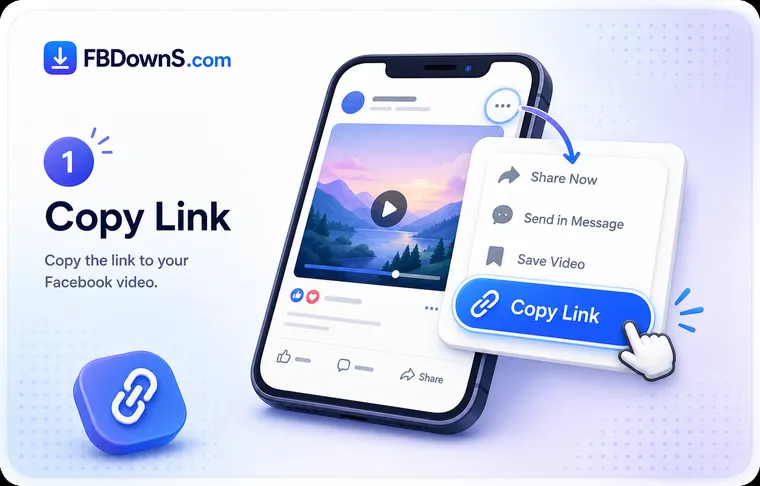
Step 1: Copy the Video Link
Open the Facebook video, tap the Share button or the three-dot menu, and select "Copy link". This copies the direct URL you need to download the Facebook video by link.

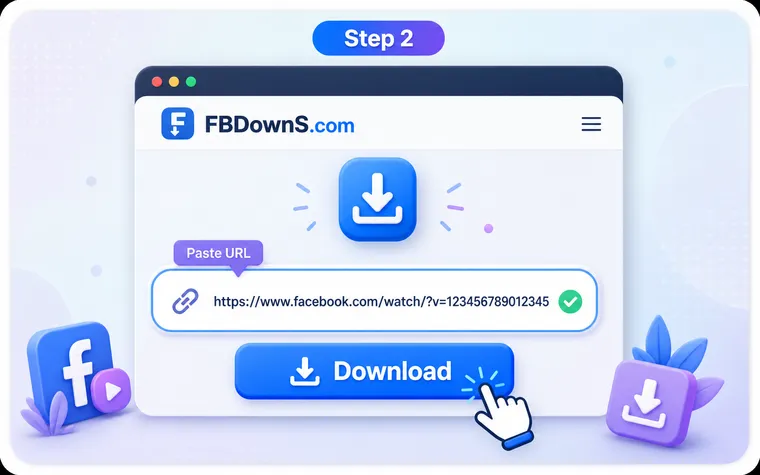
Step 2: Paste & Choose Your Quality
Paste the copied link into the input box above and click Download. FB DownS analyses the video and shows the available formats — choose Best quality for full HD or Standard for a smaller file.

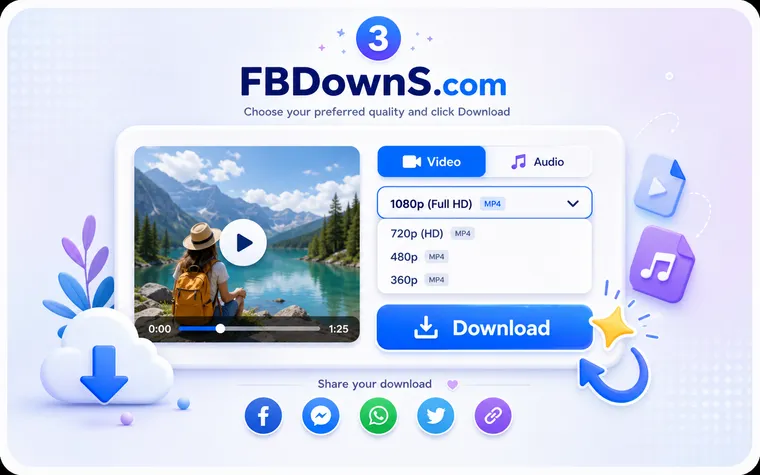
Step 3: Save to Your Device
Click Download again to save the file. On mobile it lands in your Gallery, Photos or Downloads folder; on a computer it saves to your browser's Downloads folder.
Add FB DownS to Home Screen
Add FB DownS to your home screen for quick access anytime, allowing you to download Facebook videos instantly without installing an app or using device storage.
Why Choose FB DownS to Download Facebook Videos?
100% Free & Unlimited
Download as many Facebook videos as you want, whenever you want. FB DownS is completely free with no hidden fees, no sign-up and no daily download limit.
No Watermark
Your download is the clean original file — FB DownS never stamps its own logo or text onto the video, so what you save looks exactly like what you watched.
No App or Extension
Everything runs in your browser. There is nothing to install, so you avoid bloated apps and risky browser extensions that ask for broad permissions.
Saves Straight to Your Gallery
Downloaded videos go directly to your phone's gallery or your computer's Downloads folder, ready to watch offline or share with friends.
Audio Always Included
Many downloaders hand you a silent file, because Facebook serves its top resolutions as separate video-only and audio-only streams. FB DownS only offers complete files, so every MP4 you save plays with its sound in perfect sync.
Always Updated & Reliable
Facebook changes its systems often, which breaks other tools. FB DownS is maintained continuously so it keeps working and stays fast and stable.
Save FB Videos From Any Source
Post & Feed Videos
Save the funny clips, news videos and tutorials that scroll past in your feed. Copy the link and download the Facebook video to watch or share later.
Facebook Watch
Keep long-form uploads from creators and publishers on Facebook Watch for offline viewing whenever you don't have a connection.
Reels
Download Facebook Reels as clean MP4 files. For a dedicated flow, use our Facebook Reels downloader — it works the same way with a copied link.
Story & Status Videos
Stories disappear after 24 hours. Save the ones that matter to you permanently before they expire, as long as the story is public.
Facebook Live Replays
Long livestream recordings are hard to save by hand. Paste the replay link and download the full session for stable offline playback.
Group & Page Videos
Groups and Pages often hold useful tutorials and announcements. Save that material from public posts for future reference with a single link.
Profile Videos
Download videos from your own profile or from the public profiles of friends and creators using the standard copy-link method.
Facebook Gaming VODs
Keep gameplay highlights and full streaming sessions from Facebook Gaming by saving the VOD directly to your device.
Facebook Video Download Without Watermark
FB DownS delivers watermark-free Facebook videos. We never add logos, branding or text overlays to the files you download.
Quick tip
Unlike TikTok, Facebook usually doesn't add its own watermark to uploads. So if the original clip has no watermark, your downloaded MP4 will be clean too.
If the creator burned their own logo or caption into the video before uploading, it will still appear in the download — because FB DownS gives you the original source file without re-encoding or altering the quality.
Choose Your Download Quality
Best Quality (HD)
The largest complete file Facebook publishes for that video, with audio included — commonly 720p HD. Pick it for big screens, or when you'll re-edit the clip and want every detail preserved.
High & Standard Quality
Smaller files that download faster and use less storage. Choose Standard when you're low on space or on a slow connection, or when the clip is talking-head content where fine detail doesn't matter.
The Complete Guide to Saving Facebook Videos on PC, Mac and Mobile
There are plenty of good reasons to save Facebook videos for offline viewing: a recipe demo, a workout routine, a family clip you want to keep long after it scrolls out of your feed. A downloaded MP4 lives on your device, so it plays without buffering and without depending on the original post staying online — useful before a long flight, in a classroom, or when re-using your own uploads in a new project.
How do I download Facebook videos to my computer?
On a Windows PC or a Mac, you download a Facebook video the same way: open the video in your browser, copy its link, paste it into the box at the top of this page, choose a quality and save the MP4. It lands in your Downloads folder and opens in any media player. You do not need a Windows program, a Mac application, or a paid desktop downloader with a trial period — a browser is genuinely enough, and FB DownS works in Chrome, Edge, Safari, Firefox, Brave and Opera. Doing it in the browser also avoids the two real risks of desktop downloader software: bundled adware in the installer, and an app that silently stops working the next time Facebook changes something.
Best, High or Standard quality: which should you pick?
Choose Best quality when you'll watch on a laptop, tablet or TV, or when you plan to re-edit the footage; choose Standard when storage or bandwidth is tight. Best quality is the largest complete file Facebook offers for that video, High sits in the middle, and Standard is the smallest and fastest to download. As a rough guide, a one-minute clip at Best quality can be several times larger than the same clip at Standard, so the smaller option saves meaningful space on long videos. We label them by intent rather than by pixel count because the exact resolution behind each label varies from video to video — Facebook re-encodes every upload, and what it publishes for a phone-shot Reel is not what it publishes for a studio upload.
How do I save Facebook videos without losing quality?
The key to downloading a Facebook video without quality loss is to avoid any tool that re-encodes the file, and FB DownS never does. When you click Download, your browser pulls the file directly from Facebook's own content servers — our server hands you the link and steps out of the way. That means you receive the exact bytes Facebook published: same resolution, same bitrate, same audio, no second round of compression and no watermark added. It is worth knowing that Facebook itself compresses everything on upload, so "original quality" really means the best version Facebook holds, not the untouched master the creator exported. No downloader anywhere can recover detail the platform already discarded.
Saving to iPhone, Android and tablets
Where the file lands differs by device, and knowing this ahead of time saves confusion. On Android, tap Download in Chrome and the video appears in your Downloads folder and usually in the Gallery video section within moments. On an iPhone or iPad, use Safari: the download goes to the Files app under Downloads, and to get it into your camera roll you open it in Files, tap Share and choose "Save Video" — that copies it into Photos. No jailbreak, shortcut or App Store download is needed on iOS. Because everything runs in the browser, the same paste-and-download flow works identically across phones, tablets and desktops.
Fixing a download that won't start
If a Facebook video download fails, the usual culprit is a private or restricted video — only public posts can be saved. Other quick fixes: make sure you copied the full link from the Share menu rather than a shortened preview or a profile URL, refresh the page and paste again, or try a different quality option if one stalls. On iOS, check that Safari is allowed to download files and that you have free storage. A stubborn clip often works fine on a second attempt over a stable connection. And if you want just the sound from a video — music, a podcast clip, an interview — use the MP3 option instead of downloading the full MP4 and converting it yourself.
A note on responsible use
Downloading is best kept to personal, offline use — rewatching something you enjoyed, archiving your own uploads, or keeping a copy of a clip a friend shared with you. Respect the people behind the content: videos are protected by copyright, and re-uploading or redistributing someone else's work without permission isn't fair to the creator. Be mindful of privacy too, and don't repost footage of people who wouldn't want it circulated. Stick to public posts, and never try to bypass restrictions on private or protected videos. Used this way, saving Facebook videos is simply a convenient way to enjoy content on your own terms while still respecting the creators who made it.
Facebook Video Downloader — FAQ
how to download video from facebook▾
Open the Facebook video, tap the Share button or three-dot menu and choose "Copy link". Paste that link into the box at the top of this page, click Download, choose Best, High or Standard quality, and save the MP4 to your device. The whole process takes about ten seconds and needs no app or login.
Is FB DownS free to use?▾
Yes. FB DownS is completely free with no sign-up, no subscription and no daily limit. You can download as many public Facebook videos as you want.
Do I need to install an app or browser extension?▾
No. FB DownS runs entirely in your web browser. There is nothing to download or install — just paste a link and save the video.
how to save video from facebook to gallery▾
On Android, files usually appear in your Gallery or the Downloads folder inside the Files app. On iPhone and iPad, saved videos land in the Files app under Downloads, and you can move them to Photos. On a computer, check your browser's Downloads folder.
Can I download Facebook videos in HD quality?▾
Yes. After you paste a link, FB DownS lists the complete files Facebook makes available and you pick Best, High or Standard quality. "Best quality" is the highest merged HD file Facebook publishes for that video — commonly 720p HD with audio included. It is the same file Facebook serves, so nothing is re-compressed on the way to you.
how to download facebook videos on iphone▾
Copy the video link in the Facebook app, open fbdowns.com in Safari, paste the link, tap Download and choose a quality. The file saves to the Files app, and from there you can save it into Photos. No app or jailbreak is needed.
how to download facebook videos on android▾
Copy the link from the Facebook app, open fbdowns.com in Chrome, paste it, tap Download and pick a quality. The video saves to your Downloads folder or Gallery automatically.
Can I download Facebook videos on a Mac or Windows PC?▾
Yes. The process is identical on desktop: copy the Facebook video URL, paste it here, choose a quality and the MP4 saves to your browser's Downloads folder. It works in Chrome, Safari, Edge and Firefox.
Can I extract just the MP3 audio from a Facebook video?▾
Yes. Paste the video link and choose the MP3 / audio option to save only the sound as an audio file — handy for music, podcasts and interviews.
Do I need a Facebook account or to log in?▾
No. FB DownS never asks you to log in and never sees your Facebook credentials. You only provide the public link to the video you want to save.
Will the downloaded video have a watermark?▾
No. FB DownS never adds a logo or watermark. You receive the original file, so if the uploader didn't add a watermark, your download stays clean.
how to download private facebook videos▾
FB DownS only works with content you are allowed to view. It cannot bypass privacy settings or access videos restricted to people you're not authorised to see. For videos you can legitimately view, see our private Facebook video guide.
Is it legal to download Facebook videos?▾
Downloading videos for personal, offline use — especially your own content or clips you have permission to save — is generally fine. Always respect copyright and the uploader's rights: don't re-publish or monetise someone else's video without permission.
Why is my Facebook video download not working?▾
The most common cause is a link that isn't a direct video URL — make sure you used "Copy link" on the video itself, not a profile or search page. Private, deleted or region-blocked videos also can't be fetched. Re-copy the link and try again.
Does FB DownS store the videos I download?▾
No. The file transfers directly from Facebook's content servers to your browser — it never passes through or sits on our servers. We keep no copies and no download history, so your activity stays private.
Can I download Facebook videos in 4K resolution?▾
Almost never, and any tool that guarantees 4K Facebook downloads is overselling it. Facebook compresses videos on upload and serves its highest resolutions as separate video-only and audio-only streams, which would need server-side merging to become one playable file. FB DownS gives you the best complete file Facebook actually publishes — usually 720p HD, sometimes a merged 1080p — always with the audio included.
What video format do I get — is it MP4?▾
You get MP4, because that is what Facebook itself stores and serves (H.264 video with AAC audio). There is no conversion step and no quality loss. MP4 plays on virtually every device, player and editor, and uploads cleanly to other platforms.
How do I download Facebook videos without losing quality?▾
Use a tool that doesn't re-encode. FB DownS passes the file straight from Facebook's servers to your browser, so you receive the exact bytes Facebook published — same resolution, same bitrate, no second compression pass and no watermark. Bear in mind Facebook already compresses every upload, so the best available file is Facebook's version, not the creator's original master.
Can I download Facebook videos directly through a web browser?▾
Yes — that is the only thing FB DownS needs. Paste the video link into the box on this page and your browser saves the MP4 itself. It works in Chrome, Safari, Edge, Firefox, Brave and Opera on any operating system, with nothing to install.
How do I download Facebook videos on a Windows PC?▾
Open the video on Facebook in your browser, copy the URL from the address bar or the Share menu, paste it here and click Download. Choose a quality and the MP4 saves to your Windows Downloads folder, ready to play in Windows Media Player or VLC. No Windows program or installer is required.
How do I download Facebook videos on a Mac computer?▾
Exactly as on a PC: copy the Facebook video link, paste it into the box at the top of this page, choose a quality and save. The MP4 goes to your Mac's Downloads folder and opens in QuickTime or VLC. Safari, Chrome and Firefox all work, and you don't need a Mac application.
Do I need a desktop application or program to download Facebook videos?▾
No. A browser-based tool does the same job without an installer, without a trial period and without the adware that often ships inside free downloader software. Desktop apps also break whenever Facebook changes its systems, whereas a web tool is updated centrally so it keeps working.
Where can I find a browser extension or add-on for downloading Facebook videos?▾
You don't need one, and we deliberately don't publish one. Video-downloader extensions typically ask for permission to read and change data on every website you visit, which is a heavy price for a task a single web page can do. Bookmark fbdowns.com instead, or add it to your home screen for one-tap access.
How can I save Facebook videos to my phone's camera roll?▾
On Android the video usually appears in your Gallery automatically once the download finishes. On iPhone, the file saves to the Files app under Downloads — open it there, tap the Share icon and choose "Save Video" to copy it into Photos and your camera roll.
How to download Facebook Watch videos to an iPhone▾
Open the Facebook Watch video, tap the three-dot menu and choose "Copy link". Open fbdowns.com in Safari, paste the link, tap Download and pick a quality. The MP4 saves to the Files app, and from there you can move it into Photos. No jailbreak and no App Store download are involved.
Can I download multiple Facebook videos at once?▾
No — FB DownS handles one video per link, by design. There is no batch queue and no bulk mode. You can repeat the paste-and-download process as often as you like, since there are no daily limits.
How do I convert a downloaded Facebook video to another format like AVI, MOV or GIF?▾
Download the MP4 first, then convert it with a free desktop tool such as VLC or HandBrake, which handle AVI, MOV, WebM and more. FB DownS itself doesn't re-encode video, because converting would mean compressing the file a second time and losing quality. If you only want the sound, use the MP3 option here instead of converting.
How to download Facebook Reels in the highest available quality?▾
Copy the Reel's link from its Share menu, paste it here and select "Best quality" — that is the largest complete file Facebook publishes for that Reel, with audio included. Reels are usually filmed and uploaded from phones, so the best available version is typically vertical HD rather than 4K.
More Facebook download tools
Facebook Reels Downloader
Download Reels with sound, no watermark.
Facebook Story Downloader
Save Story videos & photos before they expire.
Private Video Downloader
Save private videos you're allowed to view.
Facebook Photo Downloader
Download photos in full resolution.
Facebook to MP3 Converter
Extract audio from any Facebook video.
Popular guides
Related searches
FB DownS answers all of these common ways people ask to save Facebook videos:
- download facebook video
- how to download facebook videos
- fb video download
- save video from facebook
- facebook video downloader hd
- facebook to mp4
- download video from facebook to phone
- facebook video download 1080p
- how to save a video from facebook
- facebook video saver
- downloading video on facebook
- download facebook videos online