Facebook Video Downloader Online
Save Facebook videos with nothing to install — no app, no extension, no account. It runs inside your browser on any operating system. Paste a link, pick HD or SD, done.
HD Quality100% Free & SafeMP4 & MP3
How does it work?What You Get By Keeping It In The Browser
Zero footprint on your device
Nothing is downloaded to run the tool itself — no installer, no APK, no signed package sitting in your applications list. When you close the tab, the tool is gone, and it left no files, no cache entry and no background service behind.
Runs on the browser you already have
The only dependency is a web browser, and every device ships with one. That is why there is no "download for Windows" or "get the iOS app" button anywhere on this page — the page itself is the whole tool.
Same behaviour on every OS
Windows, macOS, Linux, ChromeOS, Android and iOS all reach an identical interface. There is no platform where a feature is missing because the native build lags behind, because there is no native build at all.
No permissions to grant
An installed app can ask for storage, clipboard, notification and network permissions. A page in a tab has none of those levers to pull, so there is simply no permission dialog to read carefully or worry about later.
No account, no sign-in
You never register, never confirm an email and never type a password of any kind. A public video link is the only thing the tool ever receives from you.
Updates itself silently
When Facebook changes how it serves video, the fix ships to the live page and you get it on your next visit. There is no stale installed copy quietly breaking on your phone months after you forgot about it.
Save A Video Without Installing Anything
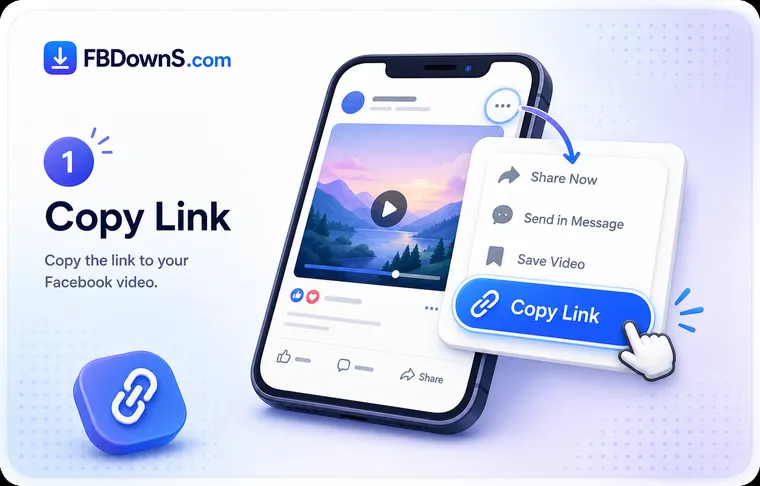
Step 1: Grab the video link
In the Facebook app, tap the three-dot menu on the post and choose Copy link. In a desktop browser, right-click the video and copy the URL, or copy it straight from the address bar. No download prompt appears at this stage because nothing is being installed.
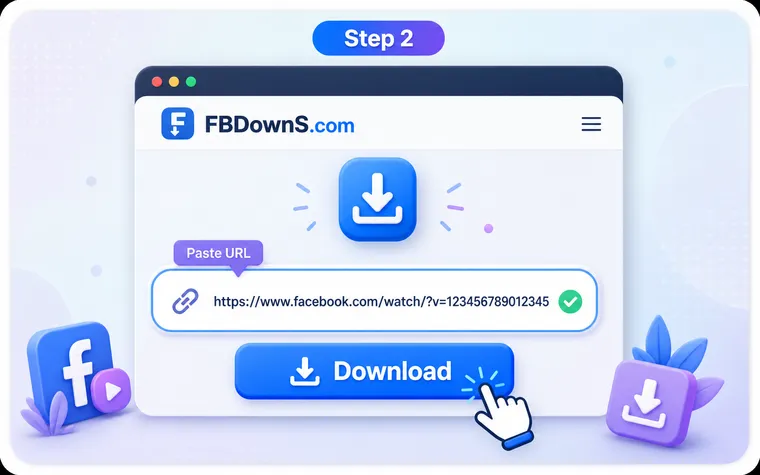
Step 2: Paste it into this page
Drop the link into the field at the top of this page and press Download. The request is handled inside the open browser tab — you are not sent to an app store, not shown a setup wizard and not asked to add anything to your browser.
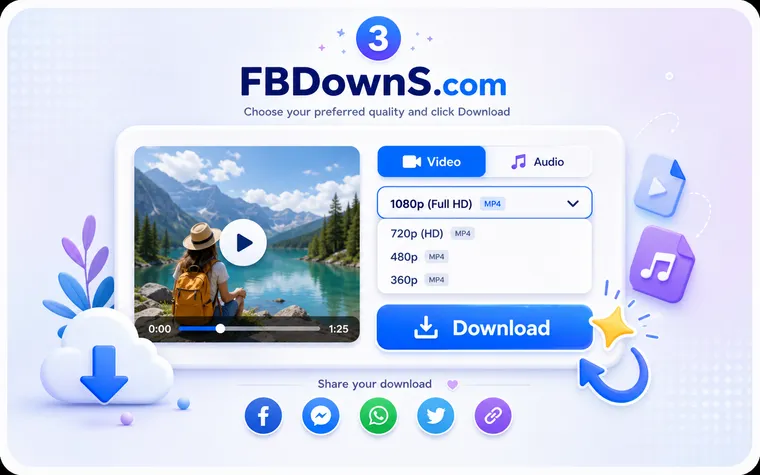
Step 3: Pick a format and save
Choose HD, SD or audio only, then confirm. The MP4 lands in your Downloads folder, Gallery or Files app depending on the device, and you can close the tab immediately afterwards with nothing left running.
Online Page vs Installed App vs Browser Extension
| What you compare | This online page | Installed app / APK | Browser extension |
|---|---|---|---|
| Installation required | None — it is a web page | Yes, a package on your device | Yes, added to your browser |
| Device permissions | No permission dialogs at all | Storage, network, sometimes more | Reads pages you visit |
| Leaves something behind | Nothing after you close the tab | App, cache and settings persist | Stays active on every site |
| Works across Windows, Mac, phones | Same page everywhere | Separate build per platform | Only inside that one browser |
| How updates reach you | Live, on your next visit | Manual update or store push | Extension store update |
| Typical malware delivery route | Not applicable — nothing installs | Sideloaded APKs are a common one | Over-permissioned add-ons are another |
Why Install-Free Is The Smarter Way To Download
Why "online" is the safer word to search for
When someone adds "online" to a downloader search, they are usually saying the same thing: keep this off my device. That instinct holds up well. The download category has a long history of apps bundled with extras, extensions that quietly read every page you open, and Android APKs handed out well away from any official store. Running the whole job inside a browser tab removes that entire class of risk in one move, because there is no package to trust, no permission to grant and nothing that outlives the tab. The tool cannot run in the background, cannot start on boot and cannot ask for access to the rest of your phone, for the simple reason that a web page has no mechanism to do any of those things.
Install-free does not mean feature-poor
There is a common assumption that a browser tool must be a cut-down version of a real application, with the good formats locked behind an install. That is not how it works here. The same HD, SD and audio-only outputs are available, there is no daily cap, and nothing is withheld to nudge you toward downloading software. The reason is structural: the demanding part of saving a video is transferring the file, and that transfer runs directly between Facebook's servers and your device whether or not any program is installed. A local app in the middle adds weight, permissions and update chores without making the download itself any faster or any better.
No-Install Facebook Downloader — FAQ
Can I download a Facebook video without installing anything at all?▾
Yes — that is the entire point of this page. There is no app, no APK, no desktop program and no browser add-on involved at any step. You paste a public link, choose a format and the file saves. The web page you are reading is the whole tool.
Do I have to add a browser extension for this to work?▾
No, and you should be cautious of any downloader that insists you do. Saving a public video needs a link and a browser, nothing more. An extension that demands permission to read every page you visit is asking for far more access than the task requires.
Will this work on a locked-down work or school computer that blocks installs?▾
Usually yes. Machines that forbid software installation still allow normal web browsing, and this tool lives entirely inside the browser. There is no installer for the device policy to block, so it stays within the rules rather than asking you to break them.
Is a browser-based downloader actually safer than an installed app?▾
It removes the riskiest parts. A page in a tab cannot request device permissions, cannot run in the background and cannot persist after you close it. The two warning signs to watch for anywhere are a tool that wants your Facebook password or one that requires an installer to finish a download.
Does skipping the app cost me any quality or speed?▾
No. The video transfers straight from Facebook's servers to your device in both cases, so speed depends on your connection and file size, not on whether a program is installed. Quality options are identical too — the same HD, SD and audio outputs, with nothing held back for an app.
How do I save a Facebook video online on an iPhone with no App Store download?▾
Copy the link inside the Facebook app, open this page in Safari, paste and choose a format. The MP4 arrives in the Files app; from there, Share then Save Video moves it into Photos. No App Store search, no dubious downloader app and no jailbreak.
Does an install-free tool leave anything behind on my device?▾
No. There is no app in your applications list, no APK in storage and no extension in your browser. Aside from the video file you chose to save, closing the tab leaves nothing — no background service, no account and no installed copy to uninstall later.
Why do some no-install downloaders stop working, and does that happen here?▾
Facebook regularly changes how it serves video, which breaks tools that are not maintained. A browser-based tool has the edge here: the fix ships to the live page and reaches you on your next visit, with no stale installed version left failing on your phone.
More Facebook download tools
Facebook Video Downloader
Save any public FB video in HD MP4.
Facebook Reels Downloader
Download Reels with sound, no watermark.
Facebook Story Downloader
Save Story videos & photos before they expire.
Private Video Downloader
Save private videos you're allowed to view.
Facebook Photo Downloader
Download photos in full resolution.
Facebook to MP3 Converter
Extract audio from any Facebook video.
Related searches
FB DownS answers all of these common ways people search for an install-free Facebook downloader:
- download facebook video without installing anything
- facebook video downloader no app
- online fb downloader no extension
- save facebook video in browser
- facebook downloader no software
- download fb video without an app
- facebook video download no install
- browser only facebook downloader
- download facebook video without extension
- no download app facebook video saver
- install free facebook video download
- facebook downloader that needs no permissions