Facebook Story Downloader
Keep a Facebook Story before it vanishes in 24 hours — save public Story videos and photos as permanent files, free and with no login. Works on iPhone, Android and desktop.
HD Quality100% Free & SafeMP4 & MP3
How does it work?Built for the way Facebook Stories work
Beat the 24-hour expiry
A Story is auto-deleted one day after posting and cannot be restored inside the app. FB DownS turns the ones that matter into permanent files, so a moment is never lost when the Story clock hits zero.
Both story videos and photos
Stories come as short clips and as still images. FB DownS saves a video Story as an MP4 and a photo Story as an image file, each in the resolution it was posted in — no guessing which button to press.
Public and own stories only
The tool works with Stories you are allowed to see: public profiles, creators and Pages, plus your own. It deliberately cannot open a friends-only Story, because that would defeat the privacy setting the poster chose.
No app, no login, no password
Everything runs in the browser tab you already have open. There is no Story-saver app to install, no extension to approve and no Facebook password to type — so nothing can touch your account.
Original quality, no watermark
Each Story is saved straight from its source file, so the download keeps the same sharpness and sound as the original and carries no FB DownS logo, label or stamp of any kind.
Free with no daily cap
Saving Stories costs nothing and needs no sign-up. There is no premium tier, no subscription and no limit on how many public Stories you keep in a day — paste a link and go.
Save a Facebook Story in 3 quick steps
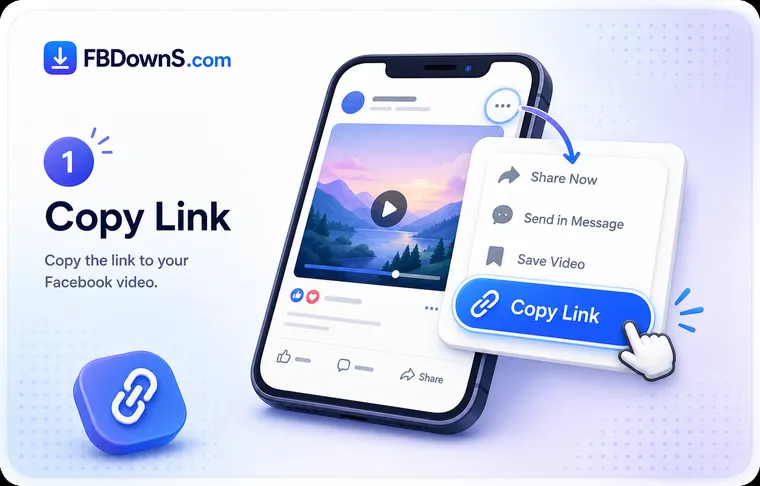
Step 1: Grab the Story link before it expires
Open the Story you want to keep while it is still live. Tap the three-dot menu on the Story and choose "Copy link", or copy the URL of the public profile or Page whose Story is playing. Because a Story is gone 24 hours after posting, do this before the clock runs out.
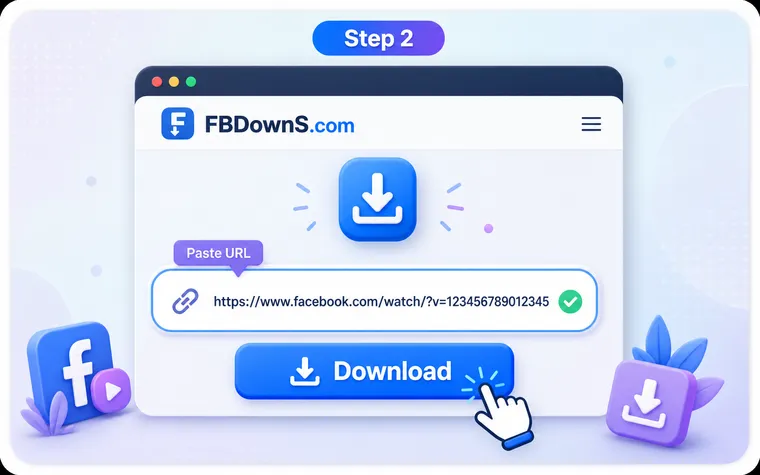
Step 2: Paste the link into the box above
Scroll to the input at the top of this page, paste the Story link and press Download. FB DownS reads the Story and shows you the available video or photo along with the quality options, usually within a few seconds.
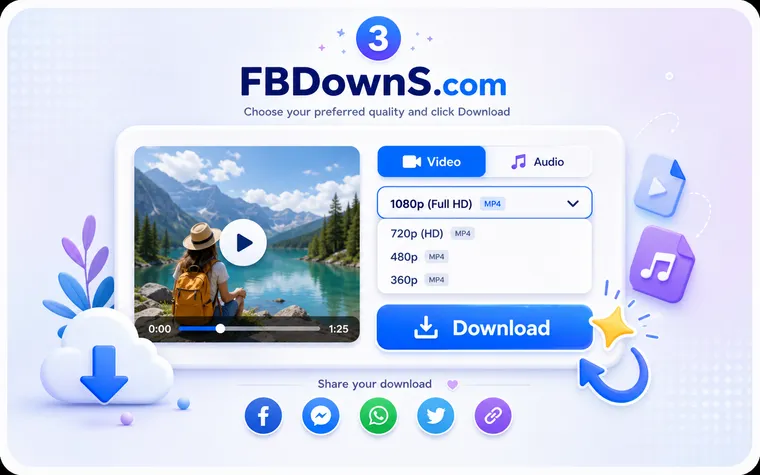
Step 3: Save the video or photo to your device
Choose the format you want and tap Download to save it. On a phone the file lands in your Gallery, Photos or Downloads folder; on a computer it goes to your browser's Downloads folder, where it stays permanently.
The 24-hour clock, and what a Story saver can and can't do
Why a Facebook Story disappears — and why that changes how you save it
A Facebook Story is a short, full-screen photo or video that sits above the feed and is removed automatically 24 hours after it goes live. That expiry is the entire point of the format, but it is also why keeping one is different from saving a normal post: the app gives you no save button for someone else's Story and no restore button once the day is up. There is no cache to dig through and no archive of another person's Stories to recover from. The only reliable way to hold on to a Story is to download a copy while it is still on screen — the moment it expires, the link that FB DownS needs to read it no longer exists. So the workflow here is time-sensitive by nature: see a Story worth keeping, copy its link, and save it now rather than later.
What to expect: privacy, viewer lists and the limits of a link-based saver
FB DownS handles one Story link at a time and only works on public content and your own Stories, so there is no bulk grab, no scheduled daily archiving and no way in for a friends-only or expired Story — those are hard limits, not settings you can toggle. Downloading a Story here does not notify the person who posted it, and no download history is kept on our side, but this is a downloader and not a stealth viewer: opening a Story inside the Facebook app still puts your name in the poster's viewer list, and no honest tool can erase it. If a Story creator burned a watermark or sticker into the image before posting, that mark is part of the picture and stays in your file — what FB DownS will never do is add a watermark of its own. Keep what you save for personal, offline viewing, and don't re-share or monetise another person's Story without asking them first.
Which Facebook Stories can you save?
Your own stories
Archive Stories you posted yourself before the 24-hour window closes. Turning on Facebook's Story Archive keeps a private replay, but downloading gives you real MP4s and images you own and can repost or edit elsewhere.
Public story videos
Save video Stories from public profiles, creators and Pages as clean MP4 files. Copy the link and download the clip while the Story is still live and playing at the top of the feed.
Public story photos
Grab still-image Stories in their original resolution. FB DownS saves the photo exactly as it appears on screen, captions and stickers included, ready to store or view offline.
Story highlights
Some accounts pin Stories to their profile as Highlights so they outlast the usual 24 hours. Public Highlight items can be saved the same way — copy the link and paste it above.
Public page stories
Brands, news outlets and community Pages post Stories with announcements and behind-the-scenes moments. Keep the useful ones from public Pages as a dated reference for later.
A friend's public story
When a friend shares a Story publicly you can save it as a keepsake. FB DownS will not reach a Story that person has limited to their friends list, because that setting is theirs to choose.
Facebook Story Downloader — FAQ
How do I save a Facebook Story before it expires after 24 hours?▾
Act while the Story is still on screen. Open it, copy its link (three-dot menu → "Copy link", or copy the public profile's URL), paste that link into the box at the top of this page and press Download. FB DownS reads the live Story and saves the video or photo to your device. Once the 24-hour window closes there is no link left to paste, so the Story can no longer be fetched — timing is the whole game with Stories.
Can I recover a Facebook Story that has already disappeared?▾
Not if it was someone else's Story — once it passes 24 hours it is removed and there is no public link left for any tool to read, so it cannot be recovered. The one exception is your own Stories: if you switched on Facebook's Story Archive (Menu → Memories → Story Archive) before they expired, a private replay is stored there and you can open it, copy the link and download a real file from it.
How do I download a Facebook Story photo instead of a video?▾
The method is identical for both. Copy the Story or public profile link, paste it above and press Download. When the Story is a still image, FB DownS detects that and shows the photo with a save option so you keep it in its original resolution — you don't pick "video" or "photo" yourself, the tool serves whichever the Story actually is.
Can I save someone else's Facebook Story, and will they know?▾
You can save a Story that is publicly shared — from a public profile, creator or Page. The download itself is silent: FB DownS never tells anyone you saved a Story and the poster gets no notification. What you cannot hide is the view — opening a Story in the Facebook app adds your name to the poster's viewer list, and no legitimate tool removes it. This is a downloader, not an anonymous Story viewer.
Why can't FB DownS download a private or friends-only Story?▾
Because the poster limited who may see it, and a link-based tool has no lawful way around that setting — by design. FB DownS only reads Stories that are genuinely public, plus your own. If you paste a private, friends-only or closed-group Story link it will simply report that it cannot fetch it. Any service that claims it can pull private Stories is one to stay away from.
Where does a downloaded Story end up on my phone or computer?▾
On Android, Stories usually appear in your Gallery or the Downloads folder in the Files app. On iPhone and iPad they save to the Files app under Downloads, and from there the share sheet moves a video or photo into your Photos library. On Mac, Windows or a Chromebook the file goes to your browser's Downloads folder. Nothing extra to configure — it uses your device's normal download location.
Why did my Facebook Story download fail?▾
The three usual causes are timing, the link, and privacy: the Story has already passed its 24-hour window, the link you pasted is not a valid Story or public profile URL, or the content is private. Re-copy the link from a public Story that is still live and try again. Facebook also changes how Stories are delivered from time to time — FB DownS is kept up to date with those changes, so a fresh paste usually works.
Can I keep captions, text and stickers that are on the Story?▾
Yes — text, captions and stickers the poster placed on a Story are baked into the video or photo itself, so they come through in your download exactly as they looked on screen. There is no separate subtitle file for Stories, so there is nothing extra to enable; whatever you saw on the Story is what you get in the file.
Does FB DownS keep a record of the Stories I save?▾
No. Stories are processed on demand and are not stored on our servers, and no download history is kept against you. The file goes straight from the source to your device, and because the tool asks for nothing but a public link — no login, no app, no device permissions — there is nothing tying a saved Story back to you.
More Facebook download tools
Facebook Video Downloader
Save any public FB video in HD MP4.
Facebook Reels Downloader
Download Reels with sound, no watermark.
Private Video Downloader
Save private videos you're allowed to view.
Facebook Photo Downloader
Download photos in full resolution.
Facebook to MP3 Converter
Extract audio from any Facebook video.
Popular guides
Related searches
FB DownS covers the common ways people ask to save Facebook Stories before they disappear:
- facebook story download
- save facebook story before it expires
- download facebook story video
- facebook story downloader
- facebook story photo saver
- how to download facebook story
- recover expired facebook story
- save facebook story to gallery
- download facebook highlights
- facebook story archive download
- facebook story saver online
- save my own facebook story